Today was a bit (of a lot) of a curveball in terms of productivity and progress. The Perforce server was down for the most part of the day, so I was forced to work locally for awhile.
That said, I managed a spawner for waves of enemies. Unity doesn't allow structs to be shown in the editor, so I used a small serializable class to mark waves. Waves contain simple things such as spawn rate, enemies to spawn, and how long till the next wave, so that within that time random enemies of varying difficulty and spawn time. Alas, not the most artistic way, but that's up to the producers once they prototype level design.
Oh yeah, the bear got a funky new design as well. Looks great!
Afterward was the sturgeon, a new sort of enemy. The enemy needed a tricky bit of work in inheriting classes, mainly due to the different sort of behavior. The sturgeon starts out slow but zooms straight ahead to the left side of the screen; that, and leaves an alternating stream of bullets in its wake that also accelerate. Mike and Ike's, they be not.
Next up? Plenty! The mortar strike comes first though, so I created a quick script to get a double-touch target circle to prepare for the mortar strike.
An account of pain, struggle, and amusing discoveries found in a man's quest for game programming style and finesse.
Saturday, November 7, 2015
Friday, November 6, 2015
Day 75: Fire the Bear Claw Missiles
Fantastic news-after a struggle to the thirteenth hour last night, I finally got the compressor and decompressor working just fine and submitted the project.
Onto prototyping! I placed a (currently static enemy) in the game for now and went along with the design idea that color can be used to represent enemy health. The enemies and player all interpolate their color to a much darker hue (currently halfway to black with linear interpolation).
As for the main course, the missiles are finally implemented. I had to work a bit on inheritance in classes (bullets and health, mainly) and the missiles are a bit tricky. The way that they work is that upon a long enough swipe by the player, four missiles are fired (one after the other in a specific coroutine) and as long as that swipe is held down, the missiles will follow the finger.
The branching got a bit tricky, as I had to detect not only specific touch phases, but the moment that a missile was firing and when the finger was let go to make the missiles guidance-free. Combine that with acceleration over time and the same reaction to movement in water, and the missiles are fully usable (and quite fun!)
Before bed, I'll tackle slowing the player's vertical movement in water- thanks to the tricky accelerometer position change, it won't be easy.
Onto prototyping! I placed a (currently static enemy) in the game for now and went along with the design idea that color can be used to represent enemy health. The enemies and player all interpolate their color to a much darker hue (currently halfway to black with linear interpolation).
As for the main course, the missiles are finally implemented. I had to work a bit on inheritance in classes (bullets and health, mainly) and the missiles are a bit tricky. The way that they work is that upon a long enough swipe by the player, four missiles are fired (one after the other in a specific coroutine) and as long as that swipe is held down, the missiles will follow the finger.
The branching got a bit tricky, as I had to detect not only specific touch phases, but the moment that a missile was firing and when the finger was let go to make the missiles guidance-free. Combine that with acceleration over time and the same reaction to movement in water, and the missiles are fully usable (and quite fun!)
Before bed, I'll tackle slowing the player's vertical movement in water- thanks to the tricky accelerometer position change, it won't be easy.
Thursday, November 5, 2015
Day 74: A Watery Grave for Prototype Progress
Good news regarding the compression assignment! Turns out that out of all of the ridiculous and fancy ways we could have compressed the data, there was a simple solution that the entire Internet seemed to have no knowledge of.
In this model, one can take the range of values that can be represented with each bit size (2 bits = 4 values, 5 bits = 32 values, 16 bits = 65536 values, etc). Take the minimum and maximum of a given set of data and put each of those bit values as markers in that range, floor clamping the float values to those markers. Next up is decompressing the data - it seems I need to attach a small header containing the minimum, maximum, and bit value since the decompressor can't take command line arguments.
The downside is that the prototype class will have to be moved out of the way for a little while; I did manage circles that incorporate Unity's water texture as sections to slow down the bullets and player in the scene though. I did have to make a slight change to the shader (swizzle to the xy plane, instead of the xz plane) but otherwise it looks pretty neat:
I did have to place some restriction on the water though; if it was set to not ignore raycasting, the buttons would have trouble picking up the touch inputs if the water ran behind them.
Back to decompression work!
In this model, one can take the range of values that can be represented with each bit size (2 bits = 4 values, 5 bits = 32 values, 16 bits = 65536 values, etc). Take the minimum and maximum of a given set of data and put each of those bit values as markers in that range, floor clamping the float values to those markers. Next up is decompressing the data - it seems I need to attach a small header containing the minimum, maximum, and bit value since the decompressor can't take command line arguments.
The downside is that the prototype class will have to be moved out of the way for a little while; I did manage circles that incorporate Unity's water texture as sections to slow down the bullets and player in the scene though. I did have to make a slight change to the shader (swizzle to the xy plane, instead of the xz plane) but otherwise it looks pretty neat:
I did have to place some restriction on the water though; if it was set to not ignore raycasting, the buttons would have trouble picking up the touch inputs if the water ran behind them.
Back to decompression work!
Wednesday, November 4, 2015
Day 73: Boosting and Blasting the Salmon Armada
Today marked a great start to our RPP thus far! After consultation regarding calibration of accelerometer input, I set both a low pass filter to take out noise values (fancy term, but a linear interpolation with a set factor to reduce large values) and also took the average of the first 10 frames of acceleration for a relative factor that can be used for movement.
We decided to go with only one axis of movement for moving the ship with the accelerometer; the z axis looked as if it would work but oddly enough, the x axis is most responsive when working in Landscape orientation.
Things did get a bit tricky, however; the acceleration took awhile to catch up, especially with quick jerking movements. The application of a force, even a small one, felt like it dragged on. In response, I actually dropped the Rigidbody2D and set the position based on a clamped min/max accelerometer input. The max (0.5, for example) would be the top of the screen, while the min (-0.5) translated to the bottom of the screen. This ensures a relatively quick input without fighting with a rigidbody's movement dynamics.
As for the bullets, I used Spherical interpolation again (Sluuurp) to naturally aim the ship where the finger was being pressed, and I added a bit of the spin to the bullets to give them a little more appeal. I did run into an (obvious) problem when I had forgotten to set the player's child objects' local positions to the origin, which led to quite the mishap involving the ship rotating around an entirely different point in space.
I also put in some buttons for boosting forward and backward. The ship has a natural deceleration that pushes it back to a starting point, but the boost allows a faster jump forward and backward. This input was especially tricky, as I had to specify if the touch was on or off the button before I could shoot; Input.GetTouch(0) was no longer an option. Luckily enough, the touch list is a short one for iteration, so iterating through them and taking the first one that wasn't on a button worked well, allowing multi-touch input.
Next up? Watery areas; the salmon gotta swim through something.
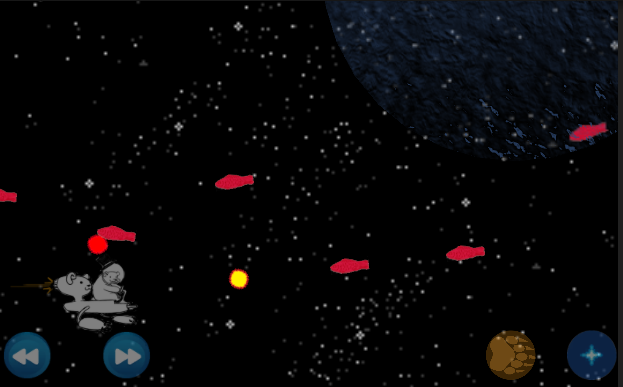
We decided to go with only one axis of movement for moving the ship with the accelerometer; the z axis looked as if it would work but oddly enough, the x axis is most responsive when working in Landscape orientation.
Things did get a bit tricky, however; the acceleration took awhile to catch up, especially with quick jerking movements. The application of a force, even a small one, felt like it dragged on. In response, I actually dropped the Rigidbody2D and set the position based on a clamped min/max accelerometer input. The max (0.5, for example) would be the top of the screen, while the min (-0.5) translated to the bottom of the screen. This ensures a relatively quick input without fighting with a rigidbody's movement dynamics.
As for the bullets, I used Spherical interpolation again (Sluuurp) to naturally aim the ship where the finger was being pressed, and I added a bit of the spin to the bullets to give them a little more appeal. I did run into an (obvious) problem when I had forgotten to set the player's child objects' local positions to the origin, which led to quite the mishap involving the ship rotating around an entirely different point in space.
I also put in some buttons for boosting forward and backward. The ship has a natural deceleration that pushes it back to a starting point, but the boost allows a faster jump forward and backward. This input was especially tricky, as I had to specify if the touch was on or off the button before I could shoot; Input.GetTouch(0) was no longer an option. Luckily enough, the touch list is a short one for iteration, so iterating through them and taking the first one that wasn't on a button worked well, allowing multi-touch input.
Next up? Watery areas; the salmon gotta swim through something.
Tuesday, November 3, 2015
Day 72: In Which The Class Has No Idea What To Do
Today took a little while to catch up; we got an idea for our next prototype (which thankfully incorporates the accelerometer work I was doing a couple of days ago!) so I'll be getting to working on a 2D prototype, as opposed to a funky 3D perspective.
The problem? We got our homework for programming (finally) in which we are set to compress a set of floating point numbers in 5-16 bits each and writing it to a stream without padding.
...How? How do we compress like this? Even the way to convert the float to a bitwise operable type (*(unsigned long*)(&f)?) was strange, and there seems to be no particular way we know or have been taught to compress or truncate bits in either the exponential or fractional part.
We can window dress the code to take in a set of data and read only the floats as necessary, but there's only so much that we can do without really knowing how to do it. Luckily I know how root mean squares work, so once I get those values in, then I can get down to business.
The problem? We got our homework for programming (finally) in which we are set to compress a set of floating point numbers in 5-16 bits each and writing it to a stream without padding.
...How? How do we compress like this? Even the way to convert the float to a bitwise operable type (*(unsigned long*)(&f)?) was strange, and there seems to be no particular way we know or have been taught to compress or truncate bits in either the exponential or fractional part.
We can window dress the code to take in a set of data and read only the floats as necessary, but there's only so much that we can do without really knowing how to do it. Luckily I know how root mean squares work, so once I get those values in, then I can get down to business.
Monday, November 2, 2015
Day 71: Fire Dem Lasers
Today just about wraps up the prototyping; all the work I had done so far was on single-touch based prototypes (sans the pinch zoom) but I decided to do one last part for multi-touch input.
The system is simple this time around; one must touch both sides of the laser gun line to transport it to a different location. I was already familiar with the Line Renderer, so the only tricky part was the actual gun pieces. They needed to rotate toward each other, but as 3D pictures in space, it was their up vectors that needed to face each other. Lo and behold, LookRotation was my answer. LookRotation is a method in Unity's Quaternion class that takes a forward and up vector and makes a proper rotation. The gun was already facing the camera, so the up vector just needed to face the direction of the other gun.
I also managed a transparency on the shader for some useful visuals for touch input; if only one gun is touched, the laser will be half-faded to note the change.
What next? Sleep; then an actual prototype!
The system is simple this time around; one must touch both sides of the laser gun line to transport it to a different location. I was already familiar with the Line Renderer, so the only tricky part was the actual gun pieces. They needed to rotate toward each other, but as 3D pictures in space, it was their up vectors that needed to face each other. Lo and behold, LookRotation was my answer. LookRotation is a method in Unity's Quaternion class that takes a forward and up vector and makes a proper rotation. The gun was already facing the camera, so the up vector just needed to face the direction of the other gun.
I also managed a transparency on the shader for some useful visuals for touch input; if only one gun is touched, the laser will be half-faded to note the change.
What next? Sleep; then an actual prototype!
Sunday, November 1, 2015
Day 70: Flippin' Out
Today was the chance to make a neat twist on the simple infinite runner; yesterday I had shown a scrolling environment, with two sides for flipping. For the flipping player, I put in a copy of the same orange circle as a player with a 2D Rigidbody. Luckily enough, the rigidbody in two-dimensional gameplay has a specific value for gravity scaling (-1, -2, 4, etc) instead of a boolean check for using gravity.
However, it was tricky balancing the jump mechanic (adding a force in the upward gravitational scale direction) and the flip mechanic. For the flip, there is currently a 100 percent chance that the starting of a touch that instantiates the jump always happens with the flip, meaning that the flip starts midair and slingshots to the other side. I initially set an initial force on the player and set it to fall past the block with a disabled collider; that way, the player wouldn't suffer on the way down.
The swipe also took a bit of work to manage correctly; I had initially thought I could use deltaPosition, but it wasn't displaying values specific for upward and downward swipes, where each flipped in the specified direction. Luckily enough, just comparing the previous touch position to the current one in terms of only the y-direction allowed a simple and manageable swipe.
And that's another prototype complete - we've only got one more day of "rest" before the plans start rolling out, so I'll get to working on multi-touch controls soon.
However, it was tricky balancing the jump mechanic (adding a force in the upward gravitational scale direction) and the flip mechanic. For the flip, there is currently a 100 percent chance that the starting of a touch that instantiates the jump always happens with the flip, meaning that the flip starts midair and slingshots to the other side. I initially set an initial force on the player and set it to fall past the block with a disabled collider; that way, the player wouldn't suffer on the way down.
The swipe also took a bit of work to manage correctly; I had initially thought I could use deltaPosition, but it wasn't displaying values specific for upward and downward swipes, where each flipped in the specified direction. Luckily enough, just comparing the previous touch position to the current one in terms of only the y-direction allowed a simple and manageable swipe.
And that's another prototype complete - we've only got one more day of "rest" before the plans start rolling out, so I'll get to working on multi-touch controls soon.
Subscribe to:
Posts (Atom)